Cab Bill Format: Free Taxi Templates in Word, Excel & PDF
 Bill Generator Team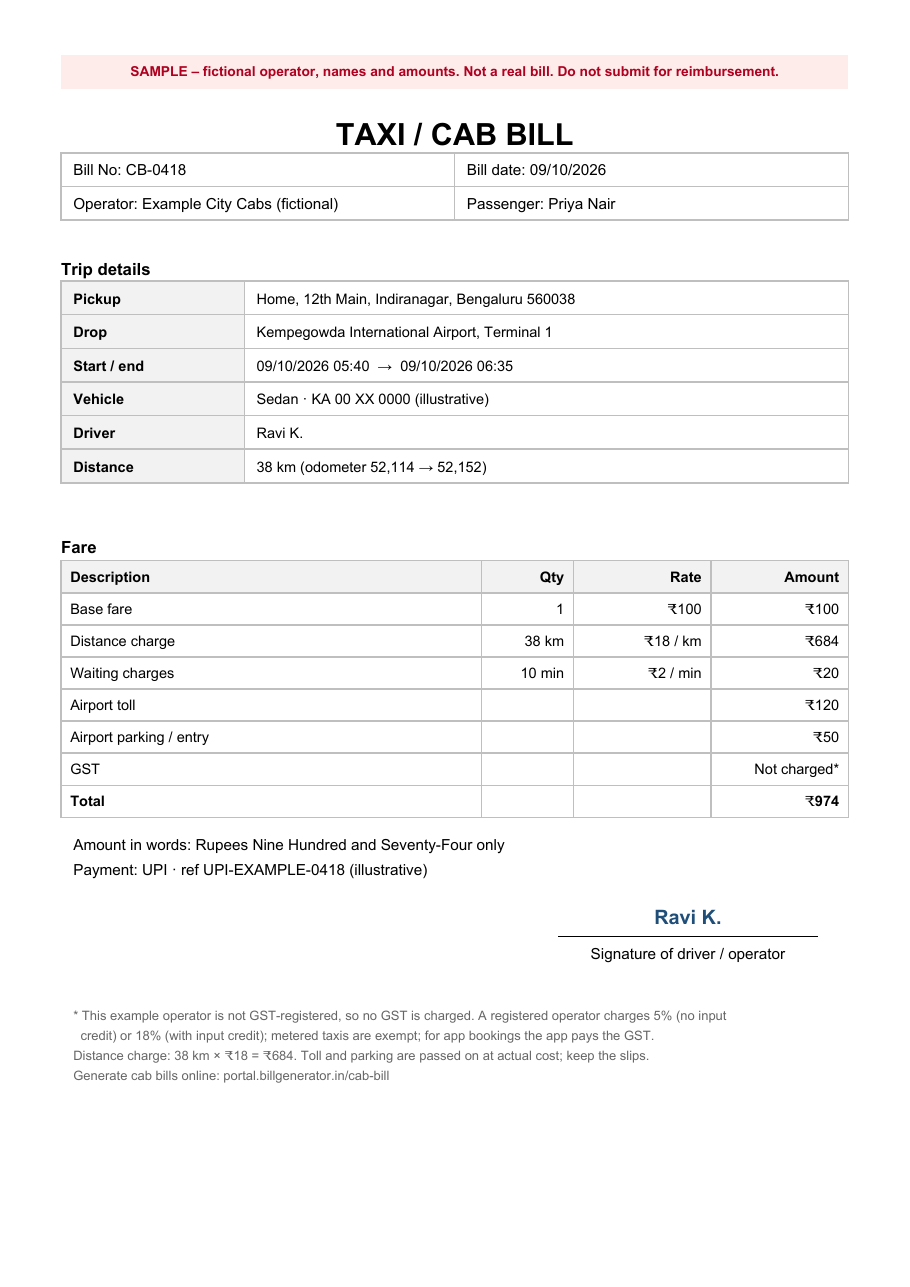
A cab bill, or taxi bill, records a genuine passenger trip and the fare charged for it. It can show the operator, passenger, vehicle, pickup and drop points, trip time, distance, fare components and payment details. Employees often use cab bills as supporting documents for local-conveyance and business-travel claims.
Download cab bill templates
The filled PDF and image contain fictional details and should be visibly marked SAMPLE / DEMO — NOT VALID FOR CLAIMS.
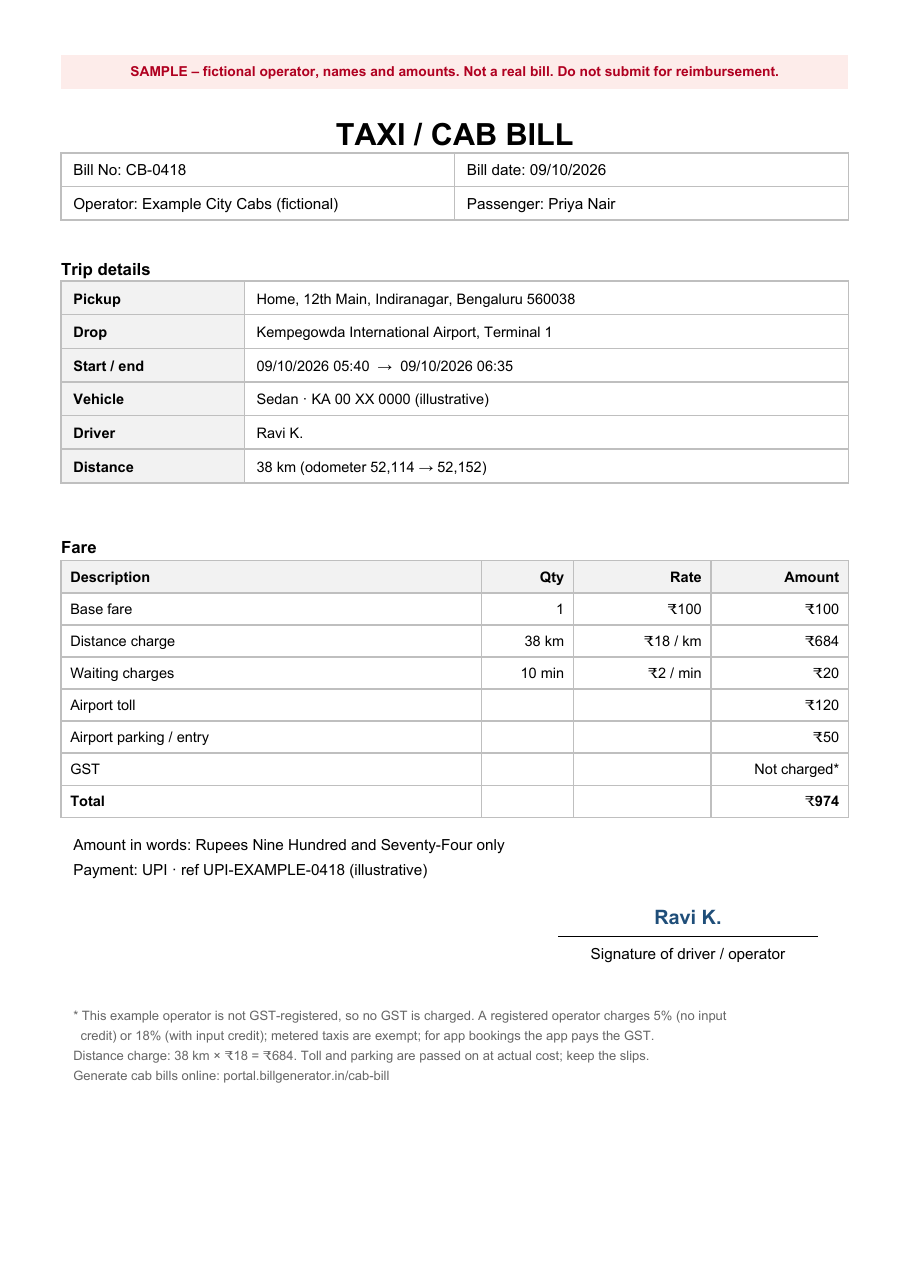
The exact fields depend on the operator and your employer's expense policy, but a useful cab bill makes the trip and fare easy to verify.
Operator and passenger
- Operator or driver's actual name and contact details
- Operator GSTIN where applicable
- Bill or receipt number and date
- Passenger or billed-to name where required for the claim
Trip details
- Pickup and drop locations
- Journey date and start/end time
- Vehicle type and registration number
- Driver name where relevant
- Distance travelled or odometer readings where recorded
Fare
- Base or trip fare
- Distance-based charge where the fare uses a per-kilometre rate
- Waiting charges where applicable
- Toll, parking, airport or permit charges actually incurred
- Night or outstation charges where applicable
- GST only where the supply is taxable and the person liable to account for GST charges it appropriately
- Total amount, payment mode and payment reference
Field-by-field
| Field | What to enter | Why it matters |
|---|---|---|
| Bill number | The operator's genuine reference | Helps identify the transaction and avoid duplicate claims |
| Journey date and time | Actual trip date and times | Connects the receipt to the business journey |
| Pickup and drop | Actual journey locations | Helps identify the trip being claimed |
| Vehicle registration | The vehicle's actual registration number | Identifies the vehicle used |
| Distance | Actual trip distance where recorded | Helps explain distance-based charges |
| Toll and parking | Amounts actually incurred | Supports additional trip costs |
| Payment reference | UPI, card, bank or other payment reference where available | Helps reconcile the bill with payment evidence |
Consider a fictional morning airport drop in Bengaluru, paid by UPI to a directly hired operator who is not registered for GST and does not charge GST on the trip:
| Item | Detail | Amount |
|---|---|---|
| Base fare | ₹100 | |
| Distance charge | 38 km × ₹18 per km | ₹684 |
| Waiting charges | 10 min × ₹2 per min | ₹20 |
| Airport toll | Actual charge | ₹120 |
| Airport parking / entry | Actual charge | ₹50 |
| GST | Not charged in this example | ₹0 |
| Total | ₹974 |
The sample can also show the pickup point, airport terminal, start and end times, vehicle registration and distance or odometer details. All names, registration numbers and payment references are fictional. The completed sample should be marked SAMPLE / DEMO — NOT VALID FOR CLAIMS.
Use the Word cab bill template for a blank editable bill with operator, passenger, trip, fare, payment and signature fields.
The Excel trip register keeps multiple genuine trips together for a monthly conveyance record. It can calculate distance-based amounts where applicable and add the entered waiting, toll, parking and other charges.
The filled sample PDF shows one completed fictional trip. All three files download without signing in.
Replace every fictional value with the details and charges from the real journey. The filled PDF is an example only and should remain visibly marked as a sample.
GST treatment depends on the type of passenger-transport service and how it is supplied.
Taxable passenger transport
For taxable passenger transport by a motor vehicle designed to carry passengers where the fuel cost is included in the consideration, the current GST rate schedule provides 5% GST with input tax credit restricted to qualifying input services in the same line of business. Under the revised structure effective from 22 September 2025, the alternative higher rate is 18% with full input tax credit, replacing the earlier 12% rate. See the Finance Ministry's 56th GST Council rate summary and the CBIC services rate table.
Do not add GST merely because a template contains a tax field. Whether GST should appear depends on the actual supply, the supplier's status and, for platform bookings, the special rules for electronic commerce operators.
Metered taxis and auto-rickshaws
Direct transportation of passengers by metered cabs and auto-rickshaws, including e-rickshaws, is listed as exempt in the current GST exemption schedule. However, that exemption expressly does not apply where the covered service is supplied through an electronic commerce operator and is notified under the section 9(5) mechanism. See the CBIC GST services rate and exemption table.
Ola, Uber and other app-based bookings
Notification No. 17/2017-Central Tax (Rate), issued under section 9(5) of the CGST Act, places the GST liability on the electronic commerce operator for covered passenger-transport services supplied through it, including transportation by radio-taxi, motorcab, maxicab and motorcycle. See Notification No. 17/2017-Central Tax (Rate).
For an app-booked ride, use the genuine invoice or trip receipt made available through the platform rather than recreating the operator's document. For Uber-related records, see the Uber invoice guide.
GST classifications can depend on the specific service, so businesses should confirm the treatment applicable to their actual operations.
- Cab bill: records a particular cab or taxi trip and its charges.
- Travel or expense claim: is usually the employee's summary of several business-travel expenses for a period. Individual cab, hotel, rail or other supporting documents may be attached according to the employer's policy.
- App invoice or trip receipt: is the document supplied through the booking platform for an app-booked journey. Use that original record rather than recreating the platform or driver's identity on another bill.
The Excel template on this page can be used as a personal trip register, but it does not replace genuine operator or platform-issued evidence where your employer requires it.
- Open the cab bill generator and choose one of the available templates.
- Enter the genuine customer and driver details and the applicable registration, GST or transaction reference.
- Add the payment details, trip amount and tax only where applicable.
- Enter the vehicle number, vehicle type and actual distance.
- Add the pickup and drop points and the correct journey times.
- Add only genuine additional charges supported by the selected template, such as a convenience fee or airport pickup charge.
- Review the live preview carefully, sign in and generate the PDF.
The available fields can vary between templates, so use the inputs shown for the selected design rather than inventing information that was not part of the real journey.
A reusable layout helps an authorised operator record the same core information consistently: trip date, passenger, driver, vehicle, route, distance, fare and payment. For employees tracking several genuine journeys, the Excel register can also provide a month-wise view before the original bills or platform receipts are submitted with an expense claim.
Keep a clean master template separately and give every real trip its own bill or reference. Do not overwrite an earlier journey and present it as a new one.
PDF preserves the layout when a cab bill is shared or uploaded to an expense system. Before exporting, check that:
- The passenger, operator and vehicle details are correct
- Pickup, drop, date and time match the actual journey
- Distance-based calculations reconcile where that pricing method is used
- Toll, parking, airport and other extra charges are amounts actually incurred
- GST is shown only where applicable
- The total matches the amount actually charged and paid
- The payment reference is included where available
Open the finished PDF itself before submitting it; do not rely only on the editing preview.
Use these templates only for journeys that actually occurred and that you are authorised to document. Do not invent trips, inflate distance or charges, or copy a real taxi operator's name, logo, GSTIN, driver identity or vehicle number onto a document that operator did not issue.
For an app-booked trip, retain the genuine platform invoice or trip receipt. For a directly hired cab, obtain the operator's receipt where your employer requires one. The fictional sample on this page exists only to demonstrate the format and must not be submitted as evidence of a real journey.
- The journey date, pickup or drop does not match the actual trip.
- A distance-based fare does not reconcile with the distance and rate entered.
- The vehicle registration or driver details are copied incorrectly.
- Toll, parking or airport charges are entered without evidence where the employer requires it.
- GST is added without confirming that it applies to the actual supply.
- An app-booked journey is recreated instead of using the genuine platform record.
- The same journey is included twice in an expense claim.
What is the format of a taxi bill?
A useful taxi bill identifies the operator, trip, passenger where required, vehicle, journey date, pickup and drop, fare and payment. Depending on how the fare is calculated, it may also show distance, a per-kilometre rate, waiting charges, toll, parking, airport charges and applicable GST.
Can I download a taxi bill format in Word?
Yes. The Word template above is a blank editable format that downloads without signing in. Use it only for a genuine trip you are authorised to document, and replace every placeholder with the real transaction details.
Is there an Excel cab bill format?
Yes. The Excel file above is designed as a trip register for multiple genuine journeys. It records trip details and can calculate entered distance-based and additional charges, making it useful when preparing a monthly local-conveyance summary.
What is a travel bill format?
A travel or expense claim usually summarises several business-travel expenses for a period. The supporting documents can include individual cab receipts, platform invoices, hotel bills and other travel records according to the employer's policy. The Excel register can help organise local cab trips, but it does not replace original evidence where that is required.
Does a cab bill need GST?
Not every cab journey is treated the same way. Taxable passenger transport by motor vehicle where fuel is included can fall under the 5% restricted-ITC or 18% full-ITC structure. Direct metered-cab and auto-rickshaw passenger transport is listed as exempt, while covered services supplied through an electronic commerce operator are subject to the section 9(5) rules. Use the tax treatment that applies to the genuine transaction rather than adding a default percentage to the template.
Do I need to create a cab bill for an Uber or Ola ride?
Normally you should use the genuine invoice or trip receipt supplied through the booking platform rather than recreate it. Download the available document from your account or app and submit it according to your employer's expense policy.
How is a cab fare calculated?
There is no single fare formula for every cab service. A fare may include a base or trip amount, distance-based charges, waiting time and genuine extras such as toll, parking, airport or outstation charges. Use the operator's actual pricing and records rather than assuming the sample rates on this page apply to another trip.
Download the free templates above, or create a cab bill online for a genuine trip you are authorised to document. For other travel records, see the hotel bill format, the petrol bill format, the driver salary receipt guide and the bills and receipts hub.